HandBrake alternative for Windows: when you need a quality check, not another encoder
HandBrake is a good free transcoder, but it won't say what Reels will break, pick the HDR path or measure quality. Who should keep it, who needs a VMAF check.
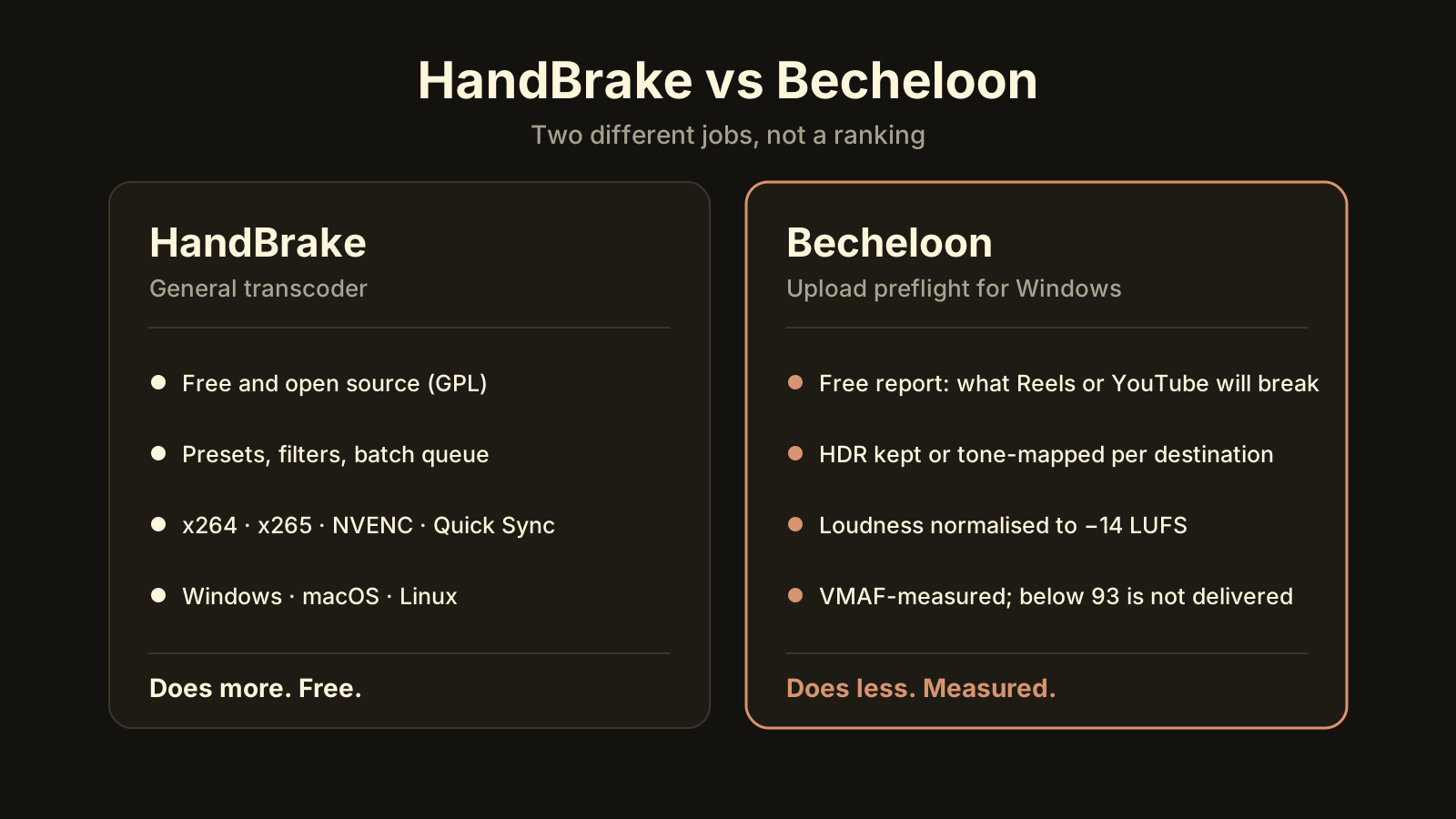
If you are looking for a HandBrake alternative on Windows, start by naming the thing HandBrake doesn’t do for you. HandBrake is a free, open-source transcoder, and a very good one. What it does not do is tell you what Instagram or YouTube will break in your file, keep or tone-map HDR for a specific destination, bring the audio to −14 LUFS, or measure the result with VMAF and refuse a bad one. Becheloon does those four things and little else. If you don’t need them, keep HandBrake; it costs nothing and does more. If you do, read on.
What does HandBrake do well?
HandBrake is a general-purpose video transcoder released under the GPL. It runs on Windows, macOS and Linux and has been the default answer to “how do I convert this video” for a long time, with reason:
- Codecs. H.264 and HEVC through x264 and x265, plus hardware encoders where the machine has them: NVIDIA NVENC, Intel Quick Sync and AMD’s encoder.
- Presets. A long list for devices, web and general use, each a sane bundle of container, codec, resolution and quality.
- Constant quality. The RF slider gives you constant-quality encoding instead of guessing a bitrate.
- Filters. Deinterlace, denoise, sharpen, crop, scale. This matters for old camcorder tapes and DVD sources.
- Batch queue. Add twenty files, set a preset, walk away.
- Subtitles and chapters. Soft or burned-in subtitles, chapter markers, multiple audio tracks.
- Price. Free, no limits, no account.
Nothing below is a criticism of any of that. HandBrake solves the problem it set out to solve.
What doesn’t HandBrake do when the file is going online?
Uploading is a different problem from converting. The platform will re-encode whatever you send, so the job is to hand it a file that survives that re-encode well. Four things decide that, and HandBrake leaves all four to you.
1. It doesn’t know the destination. A preset can set 1080p and H.264, but it won’t check that a Reel should be 1080 × 1920 at 30 fps and no longer than 90 seconds, or that YouTube recommends about 8 Mb/s for 1080p30 and 12 for 1080p60. HandBrake will happily export a 4K60 HDR Reel. Instagram will then do what it does, and you find out after publishing.
2. It doesn’t choose the colour path per destination. iPhone HDR going to Reels should stay HDR; the same clip going to TikTok needs an SDR tone-map, and a Log clip needs the camera maker’s LUT before anything else. HandBrake can be configured for 10-bit HEVC, but the decision and the LUT are yours to find and apply. Get it wrong and the clip looks washed out.
3. It doesn’t normalise loudness. HandBrake has a gain control. It does not run two-pass loudness normalisation to a target. YouTube plays at around −14 LUFS and turns louder uploads down, so a track that peaks hot and sits loud gets squashed by the platform instead of by you. Loudness and YouTube covers the numbers.
4. It doesn’t measure the result. HandBrake shows a preview and a file size. It doesn’t compare the output to the source with a metric and it never declines to hand over a file. If RF 28 was too aggressive for your confetti scene, nothing tells you.
None of this is a missing feature; it’s a different job. HandBrake is a workshop. Upload preflight is a checklist.
How is Becheloon different from HandBrake?
Becheloon is narrower on purpose. You drop a file, it reports in a few seconds what Reels, YouTube or TikTok will break, then it builds one upload-ready copy, measures it with VMAF, and refuses to call it ready if the score is under 93. That’s the whole product.
| Criterion | HandBrake | Becheloon |
|---|---|---|
| Price | Free and open source (GPL) | First 3 videos free; then $6.99/month, $17.99/3 months, $59/year |
| Platforms | Windows, macOS, Linux | Windows 10/11 x64 only |
| What it is | General transcoder with presets and filters | Upload preflight: check, fix, measure |
| Encoders | x264, x265, NVENC, Quick Sync, AMD | NVENC, Quick Sync, AMD AMF, Kvazaar, Media Foundation; chosen and self-tested automatically |
| Destination rules | You read the platform’s spec and set it | Built in for YouTube, Reels, TikTok and a light Telegram/WhatsApp preset |
| HDR and Log | You configure 10-bit output and find a LUT | Keeps HDR for YouTube and iPhone→Reels, tone-maps for TikTok, applies Apple/Samsung/DJI/GoPro LUTs or your own .cube |
| Loudness | Gain and DRC | Two-pass normalisation to −14 LUFS, −1 dBTP |
| Quality check | Preview and file size | VMAF on 10 samples; output under 93 is not delivered |
| Filters, subtitles, chapters | Yes, extensive | No |
| Batch | Queue | Queue |
| Processing | Local | Local, offline; original never modified |
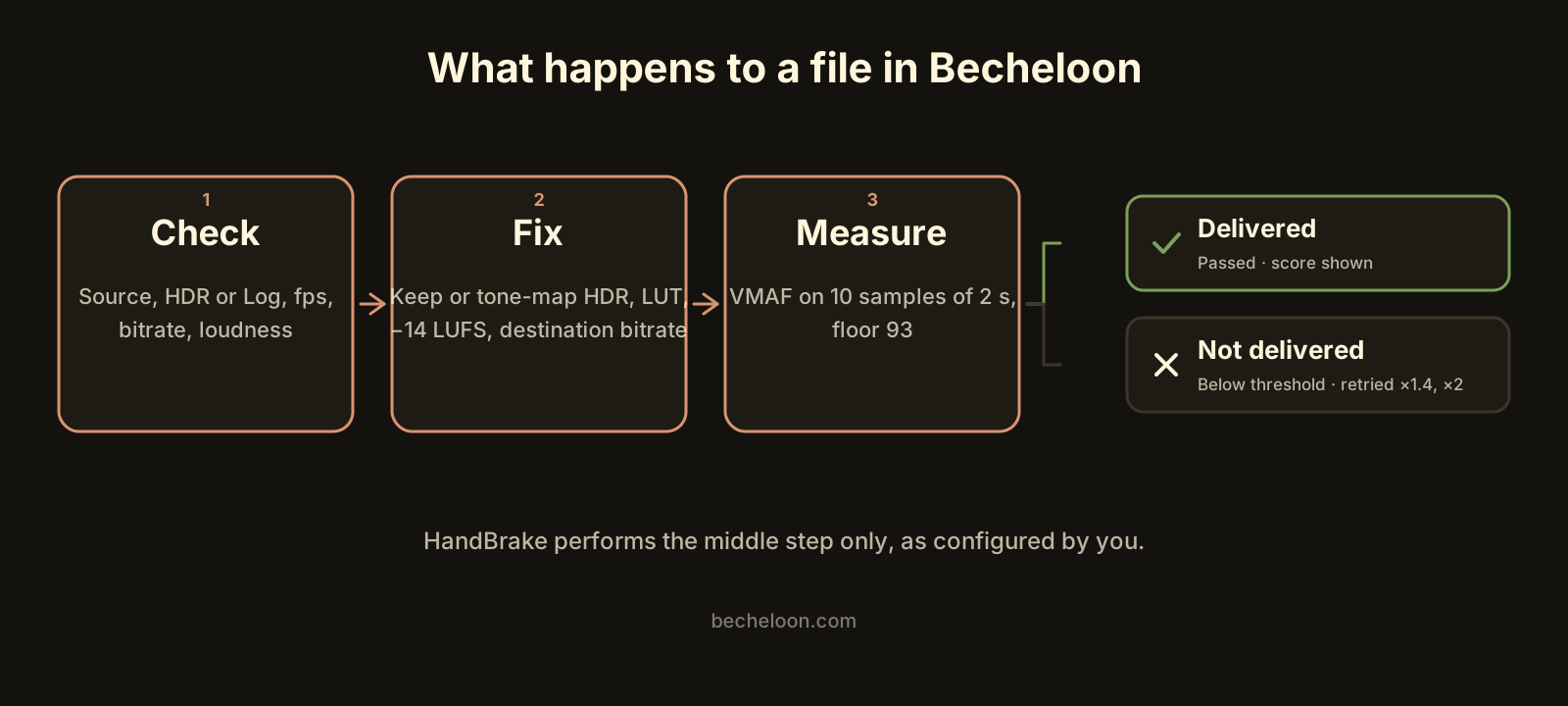 What happens to a file in Becheloon: check, fix, measure, then deliver or refuse. HandBrake does the middle step only, and only as configured.
One more difference that isn’t in the table. If a file is already right for the destination, Becheloon doesn’t re-encode it. It remuxes or returns the file as is, because a second encode of a clean file only loses quality. HandBrake will re-encode whatever you queue, which is what you asked it to do.
Who should keep HandBrake?
Be honest with yourself about which list you are on.
- You archive. Shrinking a library of camcorder tapes or old project folders is batch transcoding, and HandBrake is built for it.
- You rip DVDs and Blu-rays. HandBrake reads disc folders, handles interlacing and keeps chapters and subtitle tracks. Becheloon does none of that.
- You need filters. Denoise, deinterlace, crop, sharpen. HandBrake has them with previews.
- You are on a Mac or Linux. There is no Becheloon for either.
- You want free and unlimited. HandBrake is free forever. Becheloon gives you three full videos and a free report, then charges.
- You already know your settings. If you can quote the YouTube bitrate table from memory and own a loudness meter, you don’t need the checklist.
Who gains from Becheloon?
- You upload the same kinds of files every week and have been burned by a grey HDR Reel, a 4 GB upload that took an hour, or a video that YouTube made quiet.
- Your phone shoots formats built for editing. iPhone ProRes and Apple Log, Samsung Log and APV, DJI D-Log, GoPro GP-Log. These need a specific conversion, and the 4 GB problem explains why.
- You want a number, not a feeling. The output card says things like Quality 94/100 · 96% smaller. On a measured Galaxy S25 APV HLG clip of 143 seconds at 248 Mb/s, the Reels copy scored VMAF 94.70 at 96% smaller, in 181–211 seconds on an Intel HD 530. HandBrake can produce a smaller file than that. It just can’t tell you what it cost.
- You are on slow or metered upload. Every gigabyte you don’t send is time back: 4 GB on a 10 Mb/s upload is about 55 minutes.
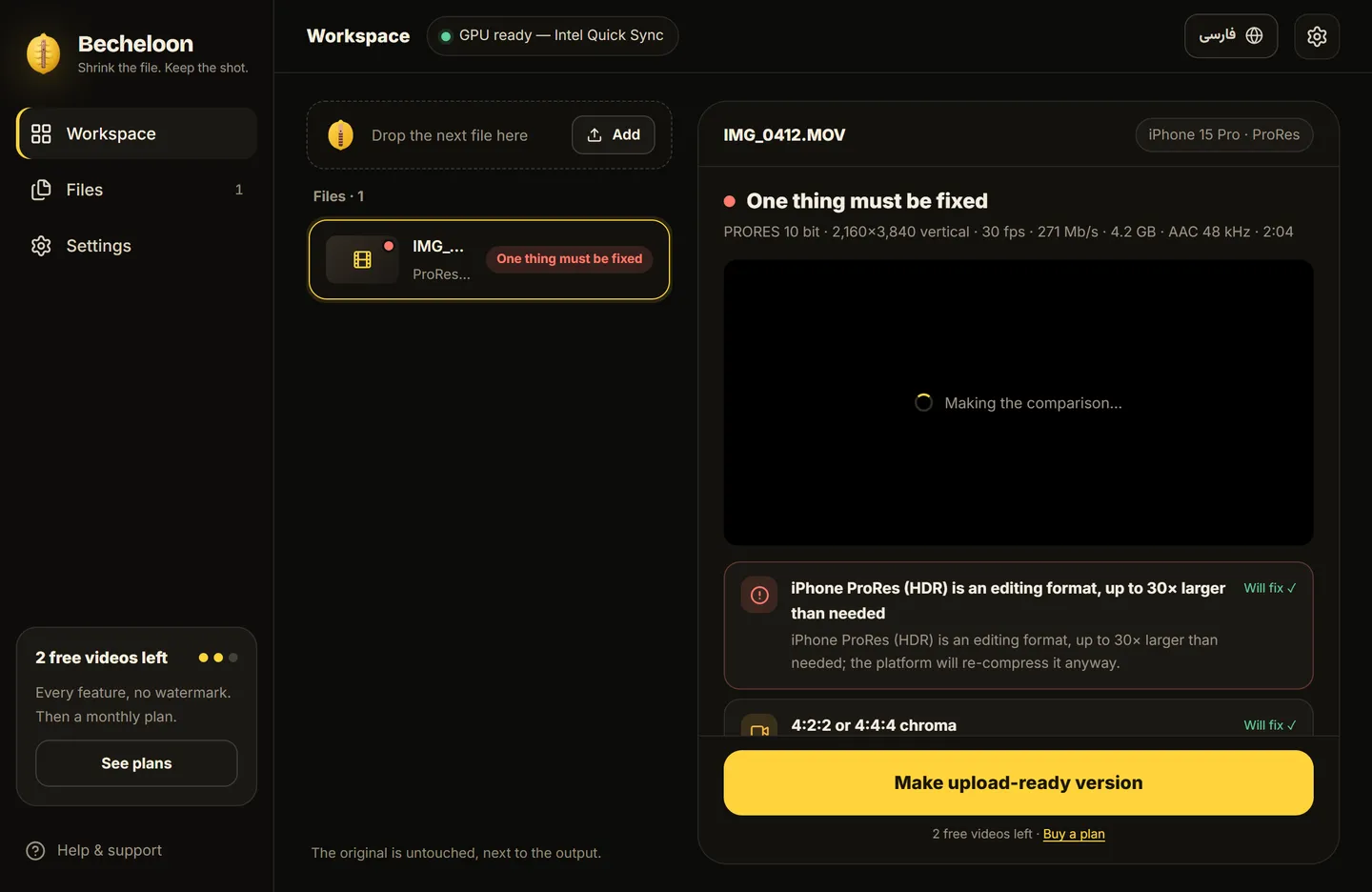 The free report. This is the part HandBrake has no equivalent for: what will break, before you encode anything.
How do you switch one upload from HandBrake to Becheloon?
You don’t have to replace anything. Try it on the next file that’s going online.
- Install it. The Windows installer is about 56 MB. It isn’t code-signed yet, so SmartScreen will warn you; that is expected.
- Drop the original, not a HandBrake export. A clean source gives the best result, and Becheloon won’t modify it.
- Read the report. It takes a few seconds and it’s free, every time. It names the source (iPhone HDR, Apple Log, APV and so on) and lists what each destination will change.
- Pick the destination and leave the balance on Balanced. Smaller −25% costs about one VMAF point; Higher quality +30% buys about one.
- Start it and wait. Encoding uses whatever hardware encoder your machine has; the VMAF check adds about 4 seconds per 2-second sample at 1080p.
- Read the card. If it says Passed with a score, upload that file. If it says Below threshold, Becheloon already retried at 1.4× and 2× bitrate and still couldn’t reach 93; it tells you why instead of handing over a soft file.
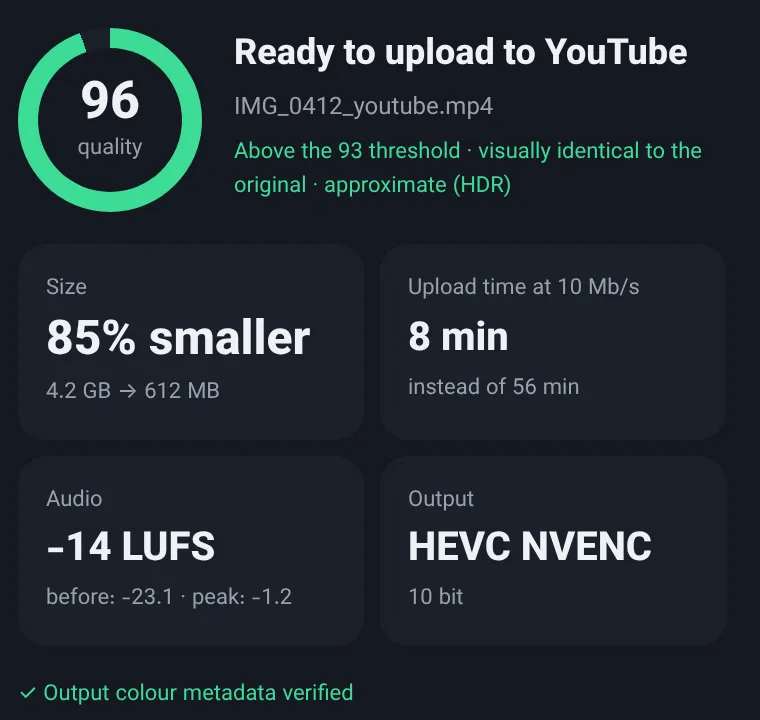 The done card. A measured score next to the size, every time. (Numbers on the screenshot are sample values.)
If you want the long version of what each step is for, how to compress a video without losing quality walks through the same list by hand.
Frequently asked questions
Is Becheloon free like HandBrake?
No. The report is always free, and the first three videos get every feature with no watermark, account or card. After that it’s $6.99 for a month, $17.99 for three months or $59 for a year, paid once, with no auto-renewal. Cards, PayPal and USDT (TRC-20) are accepted and there’s a 7-day refund. HandBrake stays free.
Can I keep using HandBrake alongside Becheloon?
Yes, and that’s the sensible setup for most people. HandBrake for archiving, discs and anything that needs filters; Becheloon for the copy that goes to Reels, YouTube, TikTok or a chat app. Becheloon never changes the original file, so there is nothing to undo.
Does Becheloon run on Mac or Linux?
No. Windows 10 and 11, x64 only. There is no Mac or ARM64 build yet. On those platforms, HandBrake plus a manual VMAF run through FFmpeg is the closest you can get to the same checklist.
The shortcut
HandBrake is the right tool for converting video, and nothing here should talk you out of it. Becheloon is for the narrower moment when a file is about to go online and you want to know, with a number, that it will arrive looking right. Drop the file, read the free report, let it fix colour and loudness, and get back a copy measured with VMAF. The first three videos are completely free. Download it or see current prices.