Apple Log and Samsung Log to Rec.709: the official LUT, in the right order
Log footage stays grey until converted. Apply the maker's Log to Rec.709 LUT first, grade after, export and measure; our Samsung Log test scored VMAF 94.96.
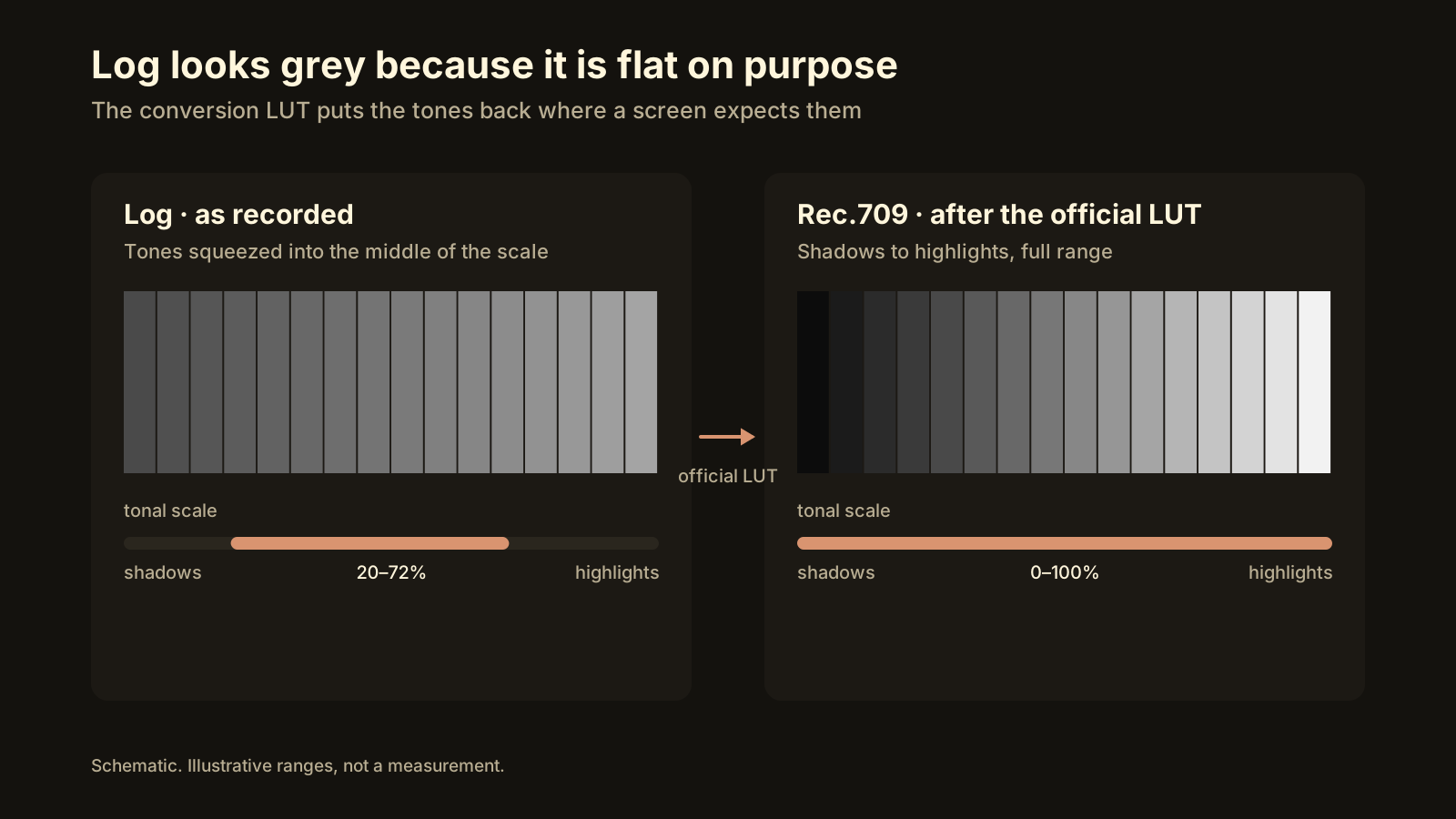
Log footage looks grey and flat because it was recorded that way on purpose, and no platform will fix it for you. The right order is: convert with the manufacturer’s official Log → Rec.709 LUT, grade on top of that if you want a look, export at the destination’s settings, then measure the result. Done that way, a Samsung Log clip we converted for YouTube in October 2026 scored VMAF 94.96 while coming out 72% smaller than the original (Intel HD 530).
What is Log, and why does it look washed out?
A phone or camera sensor captures a much wider range of brightness than a standard screen can show. Normal video solves that at recording time: it throws away part of the range and bakes contrast and saturation into the file. Log does the opposite. It keeps as much of the sensor’s dynamic range as it can by storing the picture with a logarithmic curve, in 10-bit, with low contrast and low saturation. Nothing is clipped, nothing is baked in, and the grade is left to you.
That is exactly why it looks bad raw. A Log file’s tones sit in the middle of the scale: the darkest shadows are stored as dark grey, the brightest highlights as light grey. A display that expects Rec.709 (the standard for ordinary SDR video) shows those values literally, so you get the milky, low-contrast picture that makes people ask whether their camera is broken. It isn’t. The file is a negative waiting to be printed.
Apple Log is available on iPhone 15 Pro and later. Samsung Log is on recent Galaxy flagships, including the S25 series, in the Pro video mode. DJI ships D-Log M on the Osmo Pocket 3 and Mini 4 Pro, and GoPro’s GP-Log is on recent HERO cameras. The names differ; the idea and the fix are the same.
Will YouTube or Instagram fix Log footage for me?
No. Platforms detect HDR metadata and can tone-map it, with mixed results, as why your Reel looks washed out explains. Log is different: a Log file carries no flag that says “I am Log.” To the platform’s encoder it is an ordinary SDR file that happens to be grey. It will be compressed, served and displayed exactly that way.
There is a second cost. Low-contrast footage compresses easily, so the platform’s encoder spends fewer bits on it. When a viewer later pushes up contrast on their phone, the banding and blocking that were hiding in the flat image become visible. Convert first, and the encoder sees the real picture.
Conversion LUT or creative look: what’s the difference?
A LUT (look-up table) is a file, usually .cube, that maps every input colour to an output colour. Two very different kinds of file share the name:
| Technical conversion LUT | Creative look LUT | |
|---|---|---|
| What it does | Maps the maker’s Log curve and colour space to Rec.709 | Adds a style: teal shadows, warm skin, film grain |
| Who makes it | The camera or phone manufacturer | Colourists, YouTubers, LUT shops |
| Input it expects | One specific Log format (Apple Log, Samsung Log, D-Log M, GP-Log) | Usually footage already converted to Rec.709 |
| Can you skip it? | No, if the footage is Log | Yes, always |
| On the wrong input | Crushed blacks, clipped highlights, oversaturated colour | Odd, but usually usable |
The conversion LUT is not a matter of taste. The manufacturer measured its own sensor and curve and published the exact transform that returns a neutral, correctly exposed Rec.709 image. A creative look assumes it is being applied to that neutral image, which is why a “cinematic” LUT dropped straight onto raw Log gives crushed, orange results.
Where do I get the official LUT?
- Apple Log: Apple publishes the Apple Log Profile White Paper together with the official AppleLogToRec709 LUT on the Apple Developer site. Search for “Apple Log” there; the download is free.
- Samsung Log: Samsung Developers hosts the Samsung Log documentation under its Camera section, including the default Log to Rec.709 LUT.
- DJI D-Log M: the LUT is on DJI’s download page for the specific product.
- GoPro GP-Log: GoPro Labs and GoPro support publish the GP-Log to Rec.709 LUT.
Avoid LUTs re-uploaded by third parties “for convenience.” They are sometimes re-saved at lower precision or mislabelled, and you cannot tell by looking at the file.
What order should the steps go in?
- Confirm the footage is actually Log. Check the camera setting or the file’s colour tags. If it looks grey but was shot in a normal mode, the problem is something else, usually HDR.
- Apply the official conversion LUT first, as the first operation on the clip, before any exposure or colour change. In an editor that means the first node or the input transform, not a layer on top.
- Grade after the conversion, if you want a look. Everything creative sits on the converted image.
- Export at the destination’s settings: resolution, frame rate, bitrate and loudness for YouTube, Reels or TikTok. The Rec.709 output can be 8-bit; the 10-bit precision was needed for grading, not for delivery. The guide to compressing without losing quality covers the numbers.
- Measure the result against the original. A VMAF score in the low 90s or above means the conversion and the compression did not cost visible quality; what VMAF tells you explains the scale.
- Upload the converted file, and keep the Log original for any future re-grade.
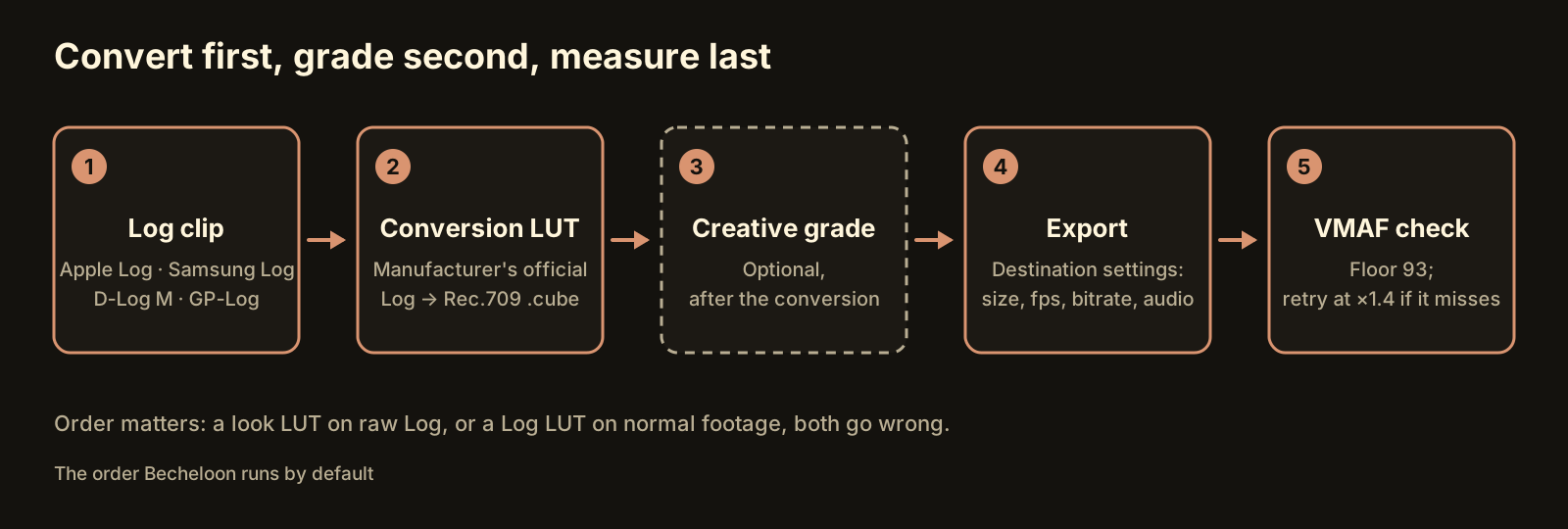 Convert first, grade second, measure last. Swapping the first two steps is the most common mistake.
What happens if I apply a Log LUT to normal footage?
The conversion LUT adds contrast and saturation because it assumes a flat input. Give it footage that already has normal contrast and it adds them again: shadows go black, highlights clip to white, skin turns orange. The same happens, less dramatically, with the wrong brand’s LUT. Samsung Log and Apple Log are different curves, and a LUT built for one will not neutralise the other.
The reverse mistake is subtler. Mixing Log clips with normal clips on one timeline and applying the LUT to the whole sequence converts the wrong half. Apply it per clip, or let software that reads the source decide which clips need it.
How does Becheloon handle Log footage?
Becheloon reads the file before it touches it. The free report identifies Apple Log, Samsung Log, DJI D-Log and GoPro GP-Log and says, in one line, what the destination would do with the file as it stands.
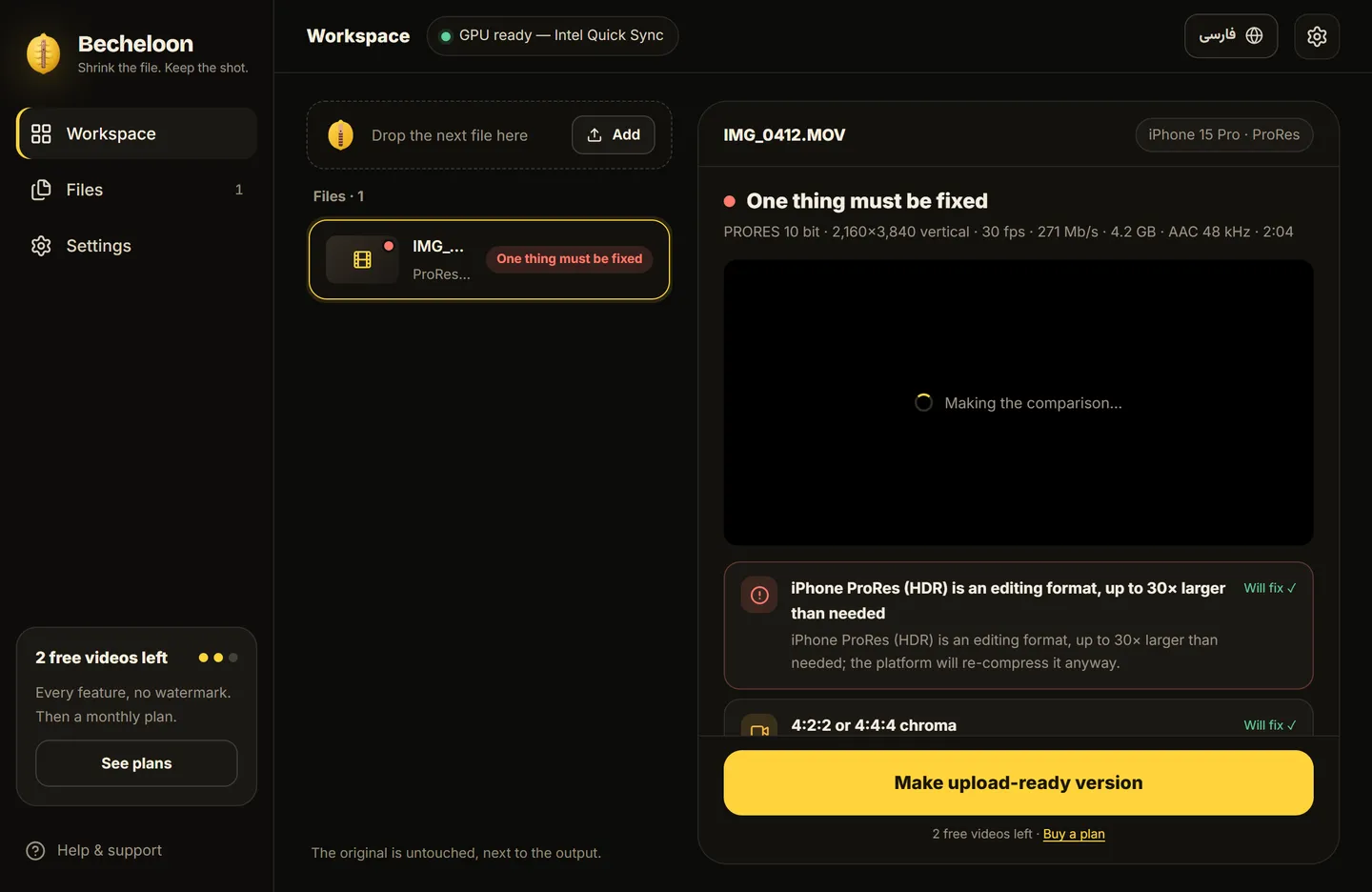 The report names the Log format and the conversion it will apply, before any encode starts.
When you make the upload version, the official conversion LUT for that format is applied by default. You can switch it off, or replace it with your own .cube in the advanced settings, if you have already graded the clip or prefer a different transform. A 3-second preview with a before/after slider shows the result before the full encode. If the official LUT file is not installed, the report says so rather than silently guessing.
Then it encodes at the destination’s settings and measures the output. In our October 2026 test, a Samsung Log clip converted for YouTube scored VMAF 94.96 and came out 72% smaller than the original, on a laptop with an Intel HD 530 graphics chip. The original file is never modified.
The shortcut
Every step above is manual work in an editor, and the one people skip is the measurement at the end. Becheloon detects the Log format, applies the official conversion, encodes for YouTube, Reels or TikTok and gives you a VMAF score for the result, on your own PC with nothing uploaded. The report is always free, and the first three videos get every feature with no watermark or account. Download for Windows or see the plans.