HEVC vs H.264: which should you upload in 2026?
HEVC needs less bitrate for the same quality and carries 10-bit HDR; H.264 plays on everything. Which to upload to YouTube, Instagram and TikTok, and where AV1 fits.
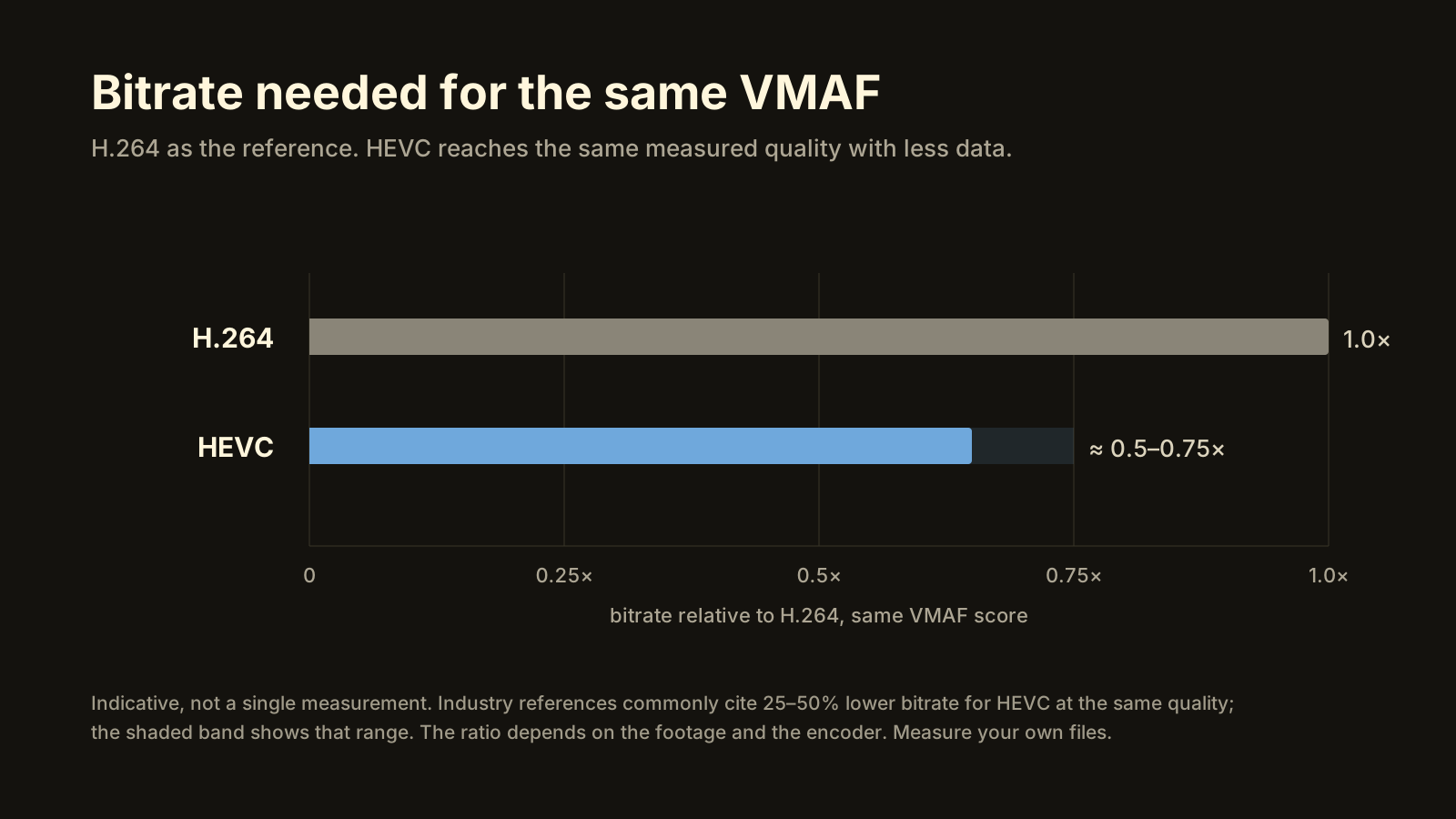
For uploads in 2026, HEVC is the better default when your encoder and your destination support it: it reaches the same VMAF at a materially lower bitrate (commonly cited as roughly 25–50% less, depending on content and encoder), it carries 10-bit HDR, and YouTube, Instagram and TikTok all accept it. H.264 is still the right choice when the file has to play on anything at all (older Windows PCs without the HEVC extension, cheap TV boxes, web browsers) or when a tool in your chain rejects HEVC. Either way, the platform re-encodes what you send; the codec you pick decides the size of your upload and whether HDR survives, not what viewers are served.
Same measured quality, less bitrate. How much less depends on the footage and the encoder.
HEVC vs H.264: what’s actually different?
H.264 (AVC) dates from 2003 and is the most widely supported video codec ever shipped. HEVC (H.265) followed in 2013 with a more sophisticated toolset: larger and more flexible block sizes, better motion prediction, and native support for 10-bit colour and HDR metadata. The cost is that HEVC needs more work to encode and decode, and it took years for that work to move into hardware.
| H.264 (AVC) | HEVC (H.265) | |
|---|---|---|
| Bitrate for the same quality | Reference | Commonly cited 25–50% lower, content-dependent |
| Playback support | Effectively universal | Phones since ~2017; PCs with hardware decode or an add-on; 4K TVs |
| Bit depth / HDR | 8-bit SDR in practice | 10-bit; HLG, HDR10, Dolby Vision |
| Encode speed (software) | Fast (x264) | Slower (x265, Kvazaar) |
| Encode speed (hardware) | Fast | Fast on NVENC, Quick Sync, AMF |
| Platform acceptance | YouTube, Instagram, TikTok | YouTube, Instagram, TikTok |
| Where it still wins | Compatibility, web embeds, old devices | File size, HDR, high-resolution uploads |
Notice what isn’t in the table: a row for “what viewers see”. YouTube, Instagram and TikTok decode whatever you upload and re-encode it into their own ladder of versions, often in VP9 or AV1. Your codec choice is about the trip to the platform, not the trip from it.
How much smaller is HEVC than H.264 at the same quality?
Industry references commonly put the saving at roughly 25–50% of the bitrate for the same perceived quality. The spread is real, not hedging: clean, static footage gains the most, grainy or fast-moving footage the least, and a good hardware H.264 encoder can land close to a mediocre HEVC one. Treat the figure as the shape of the answer, and measure your own files.
A concrete measurement from our own lab gives a sense of what 10 Mb/s of HEVC buys: a 1080p30 Samsung Log clip, 120 seconds at 34 Mb/s, re-encoded to 10 Mb/s with Intel’s Quick Sync HEVC encoder on an HD 530 scored VMAF 95.23 in the fast setting and 95.60 in the best setting, against a measurement ceiling of 97.84 for that clip. That’s a file about 70% smaller (34 → 10 Mb/s) at a score that the usual guide calls close to invisible. The same bitrate in H.264 would score lower on this material; by how much is exactly the kind of thing worth measuring rather than assuming. How to compress a video without losing quality walks through the method.
The practical consequence for uploads: at the same quality target, HEVC uploads finish sooner. A 4 GB file takes about 55 minutes on a 10 Mb/s connection; a third less data is a third less waiting.
Which plays everywhere?
H.264 does. HEVC plays on most things made in the last several years, with gaps that are still easy to hit.
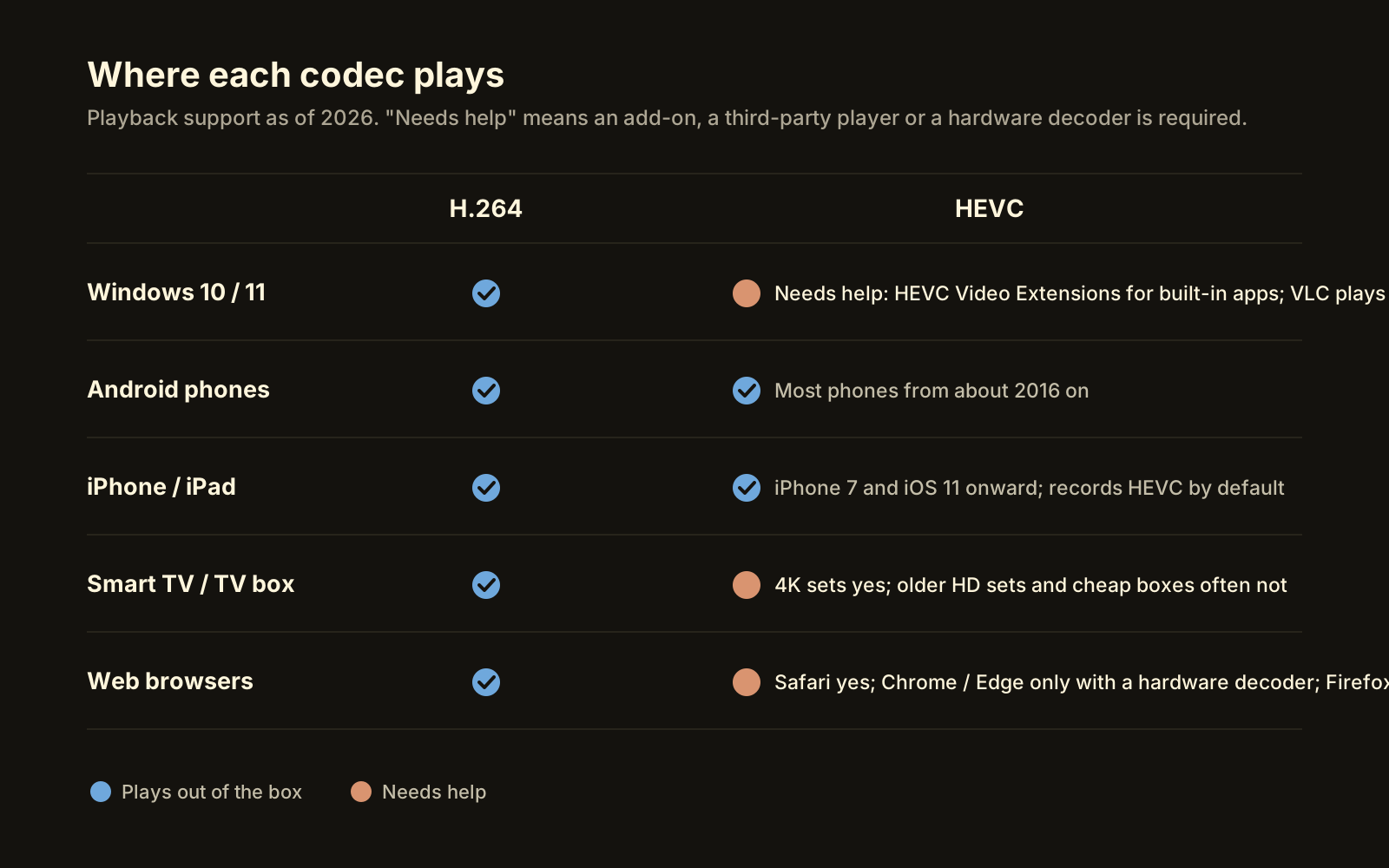 Where HEVC needs help: Windows’ built-in apps, older TV boxes, and most browsers.
- Windows 10/11. H.264 is built in. HEVC decodes in the Photos, Media Player and Movies & TV apps only with the HEVC Video Extensions add-on from the Microsoft Store (some PCs ship with a manufacturer version). VLC and mpv play HEVC regardless. Hardware decode exists on Intel from Skylake (6th gen, 2015; 10-bit from Kaby Lake), on NVIDIA from Maxwell GM206/Pascal, and on AMD from Polaris.
- Android. Phones from roughly 2016 onward decode HEVC in hardware; very cheap or very old devices may not.
- iPhone and iPad. HEVC since iPhone 7 and iOS 11 (2017). Apple records HEVC by default.
- Smart TVs and boxes. 4K sets decode HEVC because 4K broadcast and streaming rely on it. Older HD TVs and bargain Android boxes often don’t, or stutter on 10-bit.
- Browsers. H.264 plays in every browser. HEVC plays in Safari, and in Chrome and Edge only when the device has a hardware decoder; Firefox support is limited. If your file will be embedded directly in a web page, use H.264.
The rule that falls out of this: HEVC for uploads to platforms (which transcode) and for devices you’ve checked; H.264 for files handed to people or players you can’t check.
Does it matter which codec I upload to YouTube, Instagram or TikTok?
Less than people expect, because all three transcode. It matters in three specific ways.
Upload size. At the same quality, HEVC is the smaller file, so the upload finishes sooner and costs less on a metered connection. On YouTube’s own recommended bitrates (8 Mb/s for 1080p30, 12 for 1080p60, 35–45 for 2160p30), a HEVC upload at the same visual quality can sit noticeably below those numbers; the details of what to set are in YouTube upload settings and loudness.
HDR. If you want YouTube to produce an HDR version, the upload must carry 10-bit video with HDR metadata, which in practice means HEVC (or ProRes, or AV1). An 8-bit H.264 upload is SDR, full stop. The same is true for iPhone HDR going to Instagram on iOS, which now often survives in the Dolby Vision form the iPhone records.
Acceptance. All three platforms list both codecs as accepted. YouTube’s recommended upload encoding settings name H.264 as the recommended codec and accept HEVC uploads alongside it; Instagram and TikTok accept both in an MP4 or MOV. Rejections, when they happen, are nearly always about the container, the frame rate, or the file size, not the codec.
Is HEVC slower to encode?
In software, yes, noticeably: x265 and Kvazaar do more work per frame than x264. In hardware the gap mostly disappears. From the same lab session as above: Quick Sync HEVC on the HD 530 encoded the 1080p clip at 56.8 fps in its fast setting and 31.6 fps in its best setting (VMAF 95.23 and 95.60), while the software Kvazaar encoder ran at 10.5 fps for VMAF 95.90. The software path bought 0.3–0.7 of a VMAF point for roughly 2.6–4× the time (375 seconds against 145 and 94).
So the question is less “HEVC or H.264” than “do I have a hardware HEVC encoder”. Any Intel CPU with integrated graphics from 2015 on, any NVIDIA GPU from the GTX 950/10-series on, and any AMD GPU from Polaris on has one. On a laptop without any of those, software H.264 is the fast path and software HEVC is the slow one.
Which should I choose?
Decide in five steps.
- Check the destination. A platform that transcodes (YouTube, Instagram, TikTok): either codec is fine, HEVC is the smaller upload. A person, a player, a web page: default to H.264 unless you’ve checked their device.
- Check for HDR. If the source is 10-bit HDR and you want it to stay HDR, HEVC. If the destination is SDR, tone-map and either codec works.
- Check your encoder. Hardware HEVC available: use it. Only software: H.264 for speed, HEVC if you can leave it running.
- Set the quality, then the bitrate. Pick a target the destination deserves (VMAF 93 or better for anything that will be re-encoded, 95 and up for a file people will watch directly) and let the bitrate follow.
- Measure once. Encode a short sample both ways and compare the scores and sizes. Encoders differ more than codecs do, and ten minutes of measuring settles arguments that forum threads never will.
What about AV1?
AV1 is the next step: royalty-free, more efficient than HEVC, and the format YouTube and Meta increasingly serve to viewers. For uploading in 2026 it’s a reasonable choice if your hardware encodes it (Intel Arc, NVIDIA RTX 40-series and later, AMD RDNA 3 and later) and your platform accepts it; YouTube does. For everything else it has the same compatibility problem HEVC had in 2017, and software AV1 encoding is slower still. Becheloon keeps SVT-AV1 as a fallback for one case only: HDR uploads to YouTube on a machine with no 10-bit HEVC encoder.
 Each encoder is tested on first run with a short 8-bit and 10-bit encode, so the app knows what this PC can actually do.
The shortcut
Becheloon defaults to HEVC and probes your PC’s encoders in order (NVENC, Quick Sync, AMD AMF, then the software Kvazaar encoder, then Media Foundation). It picks the right codec for the destination you choose, keeps HDR where the destination can take it, measures every output with VMAF and won’t call anything under 93 ready. The free report tells you what your file is before you decide anything. First three videos free with every feature. Download it for Windows or see current prices.