NVENC vs Quick Sync vs software encoding: what the quality gap actually measures
On one laptop and one 1080p clip at 10 Mb/s, Quick Sync scored VMAF 95.60 in 145 s and software Kvazaar 95.90 in 375 s. When the GPU encoder is enough.
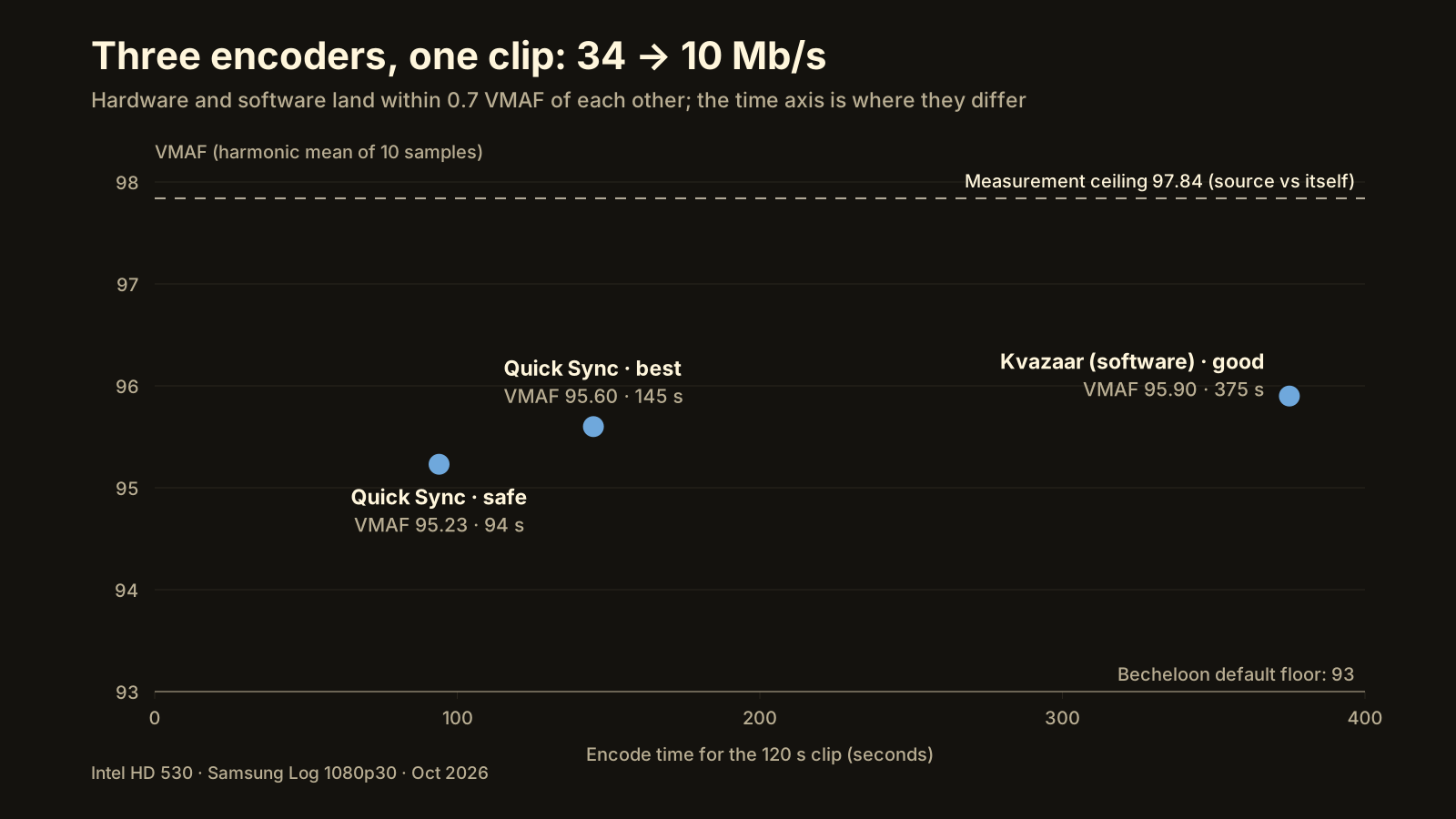
At upload bitrates, the quality gap between a hardware encoder and a software encoder is small enough to measure and usually too small to see. On a laptop with an Intel HD 530, a 120-second Samsung Log 1080p30 clip taken from 34 Mb/s down to 10 Mb/s scored VMAF 95.60 with Quick Sync (hevc_qsv, 145 s) and 95.90 with the software encoder Kvazaar (375 s): 0.3 points for 2.6 times the wait. The practical rule that falls out of it: use the hardware encoder you have, measure the result, and raise the bitrate if the score misses.
Why do GPU encoders have a reputation for looking worse?
Because for a long time, in the situation where most people compared them, they did. The comparisons that shaped the folklore came from live streaming: a fixed, low bitrate, where a software encoder on a slow preset could squeeze noticeably more detail out of each bit than the first generations of NVENC or Quick Sync. When bits are scarce, the encoder’s cleverness is everything, and in those early generations the software was cleverer.
Three things changed. Hardware encoders went through several generations and closed most of that gap. HEVC became a common upload format, with hardware support for it on most chips sold in the last few years. And the job moved: an upload to YouTube or Reels runs at 8–12 Mb/s for 1080p, a bitrate where every competent encoder has enough bits to reproduce the picture. The question stopped being “which encoder is smarter” and became “did this file reach the score I need, and how long did it take.”
What did we actually measure?
One clip, one machine, three encoder runs. The clip is a 120-second Samsung Log recording, 1080p30, 10-bit, 34 Mb/s as shot, converted to Rec.709 and encoded for YouTube at a 10 Mb/s target. The machine is a laptop with Intel HD 530 integrated graphics, which only encodes HEVC in 8-bit. VMAF is the harmonic mean of ten 2-second samples; the “min” column is the worst of the ten.
| Encoder | Tier | VMAF | Min sample | Speed | Time for 120 s |
|---|---|---|---|---|---|
| hevc_qsv (Quick Sync) | best | 95.60 | 94.37 | 31.6 fps | 145 s |
| hevc_qsv (Quick Sync) | safe | 95.23 | 94.18 | 56.8 fps | 94 s |
| libkvazaar (software) | good | 95.90 | 95.10 | 10.5 fps | 375 s |
| Measurement ceiling (source vs itself) | 97.84 |
The ceiling row matters. Measuring the original against itself through the same pipeline gives 97.84, not 100, because the conversion to Rec.709 and the scaling in the measurement path cost a little by themselves. So the real headroom between the fastest hardware encode and perfect was about 2.6 points, and the software encoder recovered 0.67 of them while taking four times longer than the safe tier.
That is one laptop and one clip. It is not a benchmark of all GPUs, and a modern NVENC or a newer Intel chip is likely to put the hardware point higher on the chart. The lesson is about the shape of the trade-off, not the exact numbers.
Does the encoder tier matter more than the bitrate?
No, and this was the most useful result. On the same machine, with the same clip:
- Moving the Quick Sync tier from safe to best cost about 1.55 times the encode time and bought 0.3–0.5 VMAF points.
- Moving the bitrate by ×0.75 cost about 1 point; moving it by ×1.3 gained about 1 point.
Bitrate is the cheap lever and the encoder tier is the expensive one. If a file misses the score you need, the first fix is more bits, not a slower encoder. This is also why Becheloon’s quality balance is expressed as a bitrate factor (Smaller ×0.75, Balanced ×1.0, Higher quality ×1.3), and why its retry after a failed check raises the bitrate by ×1.4 and then ×2 rather than switching encoders. The guide to compressing without losing quality covers how to pick the starting bitrate.
Which hardware encoder do I have?
- NVENC is the dedicated encoder block on NVIDIA GPUs. GTX 10-series cards and later encode HEVC in 10-bit. Older notebook chips, such as the GTX 950M in the lab machine, failed the probe entirely, and the test fell back to the Intel iGPU.
- Quick Sync is the encoder in Intel integrated graphics. Chips from the 7th-generation Core onward encode HEVC in 10-bit; the HD 530 here is a 6th-generation part and is 8-bit only.
- AMF (Advanced Media Framework) is AMD’s equivalent, on Radeon GPUs and Ryzen APUs; recent generations encode HEVC in 10-bit.
- Media Foundation is the Windows built-in encoding API. It routes to whatever the driver exposes, with fewer controls, and some driver combinations fail outright, which is why it sits low in the order.
- Kvazaar is an open-source software HEVC encoder whose licence is compatible with the LGPL build of FFmpeg, which is why it can ship inside a product that bundles it. It runs on the CPU, on any machine, slowly.
- SVT-AV1 is a software AV1 encoder, used only as a fallback for HDR uploads to YouTube when no HEVC 10-bit encoder is available.
The 8-bit/10-bit distinction matters only when the output needs to be 10-bit, which in practice means HDR. An SDR upload to YouTube, Reels or TikTok is fine in 8-bit, and an 8-bit-only chip such as the HD 530 is not a handicap for it.
How does Becheloon pick an encoder?
It does not read a hardware list and guess; it tries. On first run, the app runs a 2-second test encode on each candidate at both 8 and 10 bit and records what actually worked and how fast it went. On the laptop above, that is how the broken NVENC and the 8-bit-only Quick Sync were found without an error in front of the user.
- NVENC (NVIDIA), if the test passes.
- Quick Sync (Intel iGPU).
- AMF (AMD).
- Kvazaar, software, the first option that works on every PC.
- Media Foundation, for machines where the three vendor encoders are absent but the driver still exposes one.
- SVT-AV1, only for HDR to YouTube when nothing above handles 10-bit HEVC.
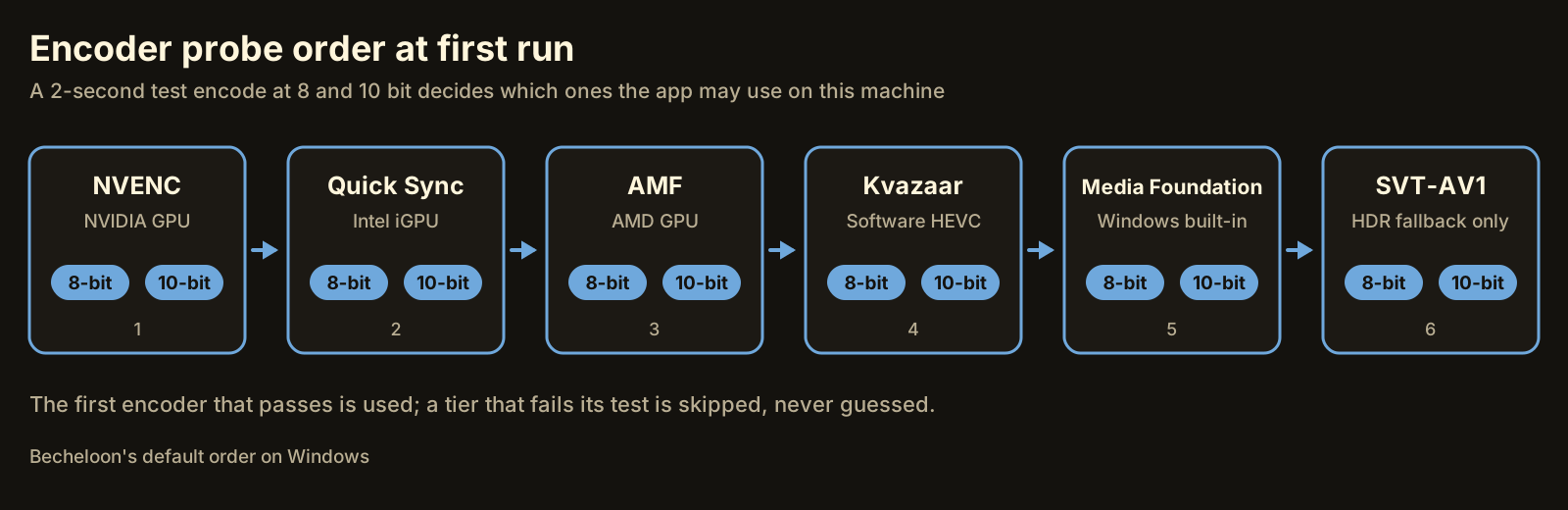 The probe runs once; the result is stored and shown on the device page.
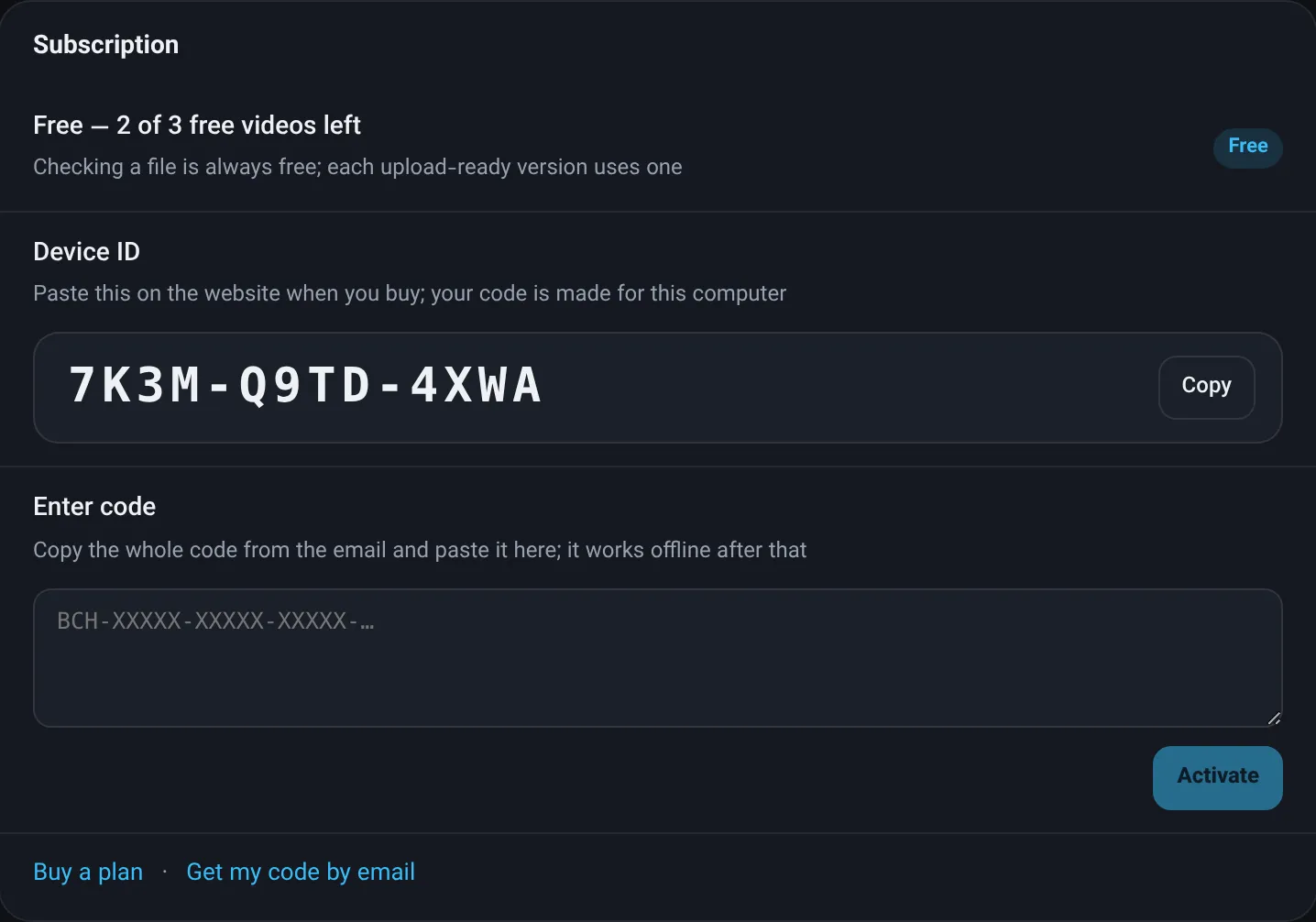 The device page shows what the probe found on this machine.
Whichever encoder is used, the output is measured with VMAF against the original, and a file under the floor of 93 is never marked ready. The score is what makes the choice safe: an encoder that happens to be weaker on a given clip gets caught, and the retry at a higher bitrate fixes it. What VMAF tells you explains how to read the number.
When is software encoding still the right choice?
- HDR output without a 10-bit hardware encoder. The lab laptop cannot encode HDR for YouTube on its GPU at all; software is the only route.
- Very low bitrates. Below upload bitrates, say for a file that must fit a strict size cap, the software encoder’s extra efficiency buys back more than it does at 10 Mb/s. Measure to find out; on this clip, Kvazaar’s advantage at 10 Mb/s was 0.3 points.
- The score misses even at the destination’s bitrate cap. Rare for phone footage, but when raising bitrate is no longer allowed, a slower encoder is the remaining lever.
- You are not in a hurry. 375 seconds for a 2-minute clip is fine once; it is not fine for a queue of twenty.
For everything else, the hardware encoder plus a measured score is the sensible default. FFmpeg’s own hardware acceleration guide lists which encoders exist on which platform if you want to run the comparison on your machine.
The shortcut
You can run this experiment yourself with FFmpeg and libvmaf; the lab notes behind this article are exactly that. Or let Becheloon do it: it probes your encoders once, uses the fastest one that works, encodes for the destination and shows a VMAF score next to every output, on your own PC. The report is free, the first three videos get every feature, and nothing is uploaded. Download for Windows or see the plans.