YouTube audio too quiet? Normalize to −14 LUFS before upload
YouTube turns loud videos down to about −14 LUFS but leaves quiet ones alone, so a −22 LUFS phone clip stays 8 dB behind. How to measure and fix it.
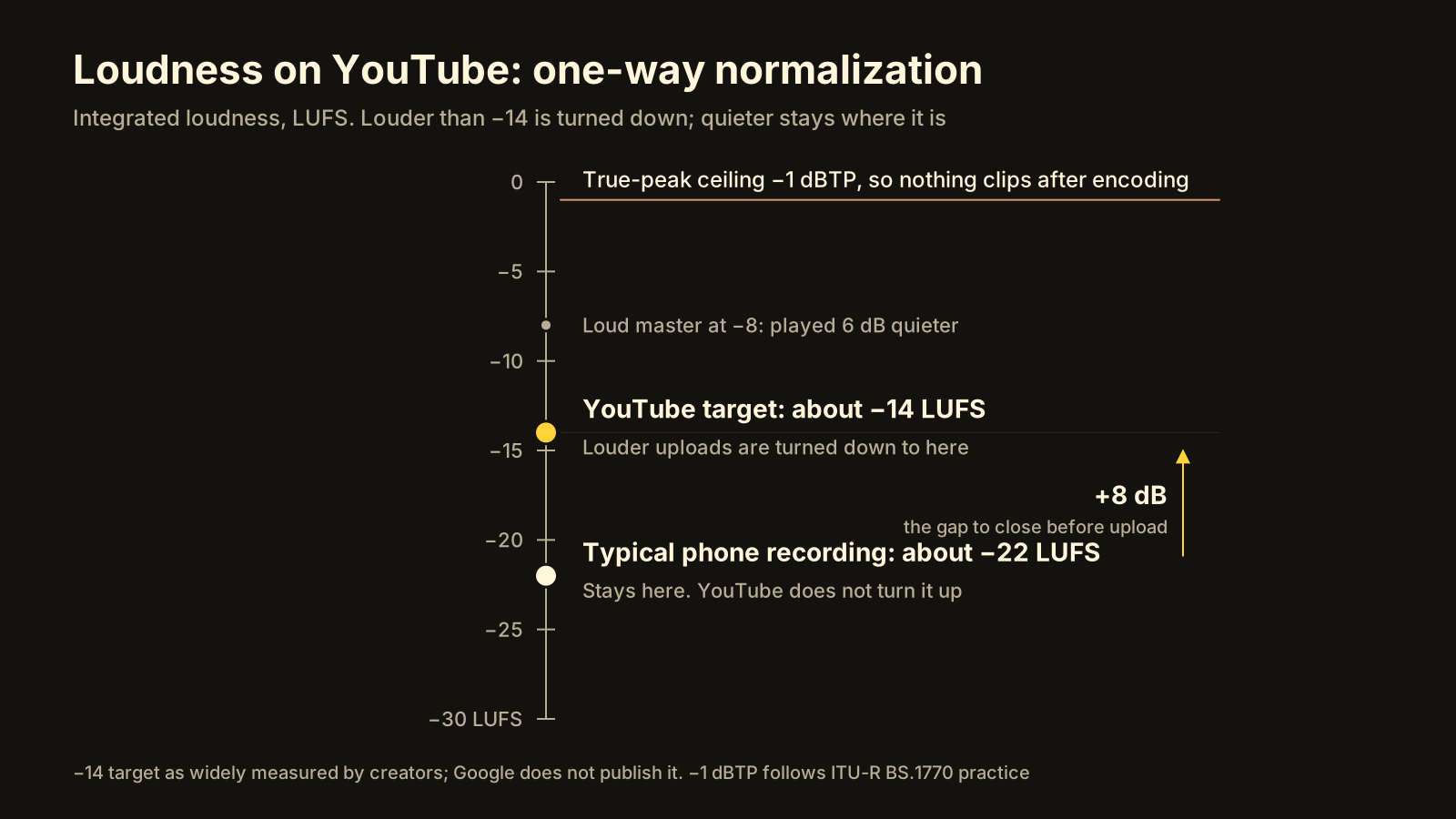
Your video sounds quiet on YouTube because YouTube normalizes loudness in one direction only: it turns loud videos down to roughly −14 LUFS and leaves quiet ones where they are. A phone recording typically lands between −20 and −25 LUFS, so next to a video that was mastered at −14 it plays 6 to 11 dB quieter, and the viewer reaches for the volume or skips. The fix is to measure the whole clip and bring it to −14 LUFS with peaks under −1 dBTP before you upload. This article explains the units, why the two-pass method matters, and the exact steps.
Why is my video quieter than other YouTube videos?
Because the other videos were turned down to meet you, and you were not turned up to meet them.
Loudness normalization on YouTube is widely documented by creators and audio engineers, though Google does not publish the target number. The observed behaviour: content louder than about −14 LUFS is attenuated to that level on playback; content quieter than −14 LUFS is played as uploaded. You can read the result on any video. Right-click the player, open Stats for nerds, and look at the Volume / Normalized line. A loud master shows something like 100% / 60% (content loudness 4.5 dB): YouTube is playing it at 60% because it measured the content 4.5 dB above target. A quiet upload shows 100% / 100% (content loudness −8.0 dB): nothing was done, and it is 8 dB under.
So the playing field is level at the top and open at the bottom. Everything that was loud now sits at −14. Anything that was quiet is still quiet.
What is LUFS, and how is it different from peak dB?
Most people check audio by looking at the meter in the editor and making sure it does not hit the red. That meter shows peak level: the single loudest sample, in dBFS, where 0 is the maximum a digital file can hold. It tells you whether the file clips. It tells you nothing about how loud it sounds.
LUFS (Loudness Units relative to Full Scale, defined in ITU-R BS.1770) measures perceived loudness: the signal is weighted toward the frequencies the ear is sensitive to and averaged over time. “Integrated” LUFS is one number for the whole programme, and that is the number streaming platforms normalize on. Two files can both peak at −1 dBFS and differ by 10 LU in loudness: one is a steady, compressed voice, the other a quiet voice with one door slam.
True peak (dBTP) is peak level measured between samples, the way a digital-to-analogue converter or a lossy encoder will actually reconstruct the wave. A file that peaks at −0.1 dBFS can exceed 0 dBTP once it is turned back into AAC or Opus, and that is where the crackle comes from.
| Measure | Unit | What it answers | Target for YouTube |
|---|---|---|---|
| Peak (sample) | dBFS | Does any sample hit the ceiling? | Below 0 |
| True peak | dBTP | Will it clip after encoding? | −1 dBTP or lower |
| Loudness (integrated) | LUFS | How loud does the whole clip sound? | About −14 LUFS |
| Loudness range | LU | How far apart are the quiet and loud parts? | Speech: roughly 11 LU or less |
Why do phone recordings come out so quiet?
Three reasons stack up:
- Conservative automatic gain. The phone cannot know when you will shout, so it leaves headroom and sits the voice low. Peaks may reach −3 dBFS on a laugh, while the average speech level sits 15 to 20 dB below that.
- Distance. A phone on a tripod a metre away picks up a voice several dB quieter than a lapel mic on the chest, and the room fills the gap with reverb rather than level.
- Dynamics. Natural speech has a wide loudness range. Untouched, the loud syllables set the peak and the quiet ones drag the integrated number down.
The result is a file that looks fine on the peak meter and measures −20 to −25 LUFS integrated. YouTube’s own re-encode does not change this; it only adds the normalization described above, which in this direction does nothing.
What does two-pass normalization do that a volume slider doesn’t?
A volume slider applies one fixed gain. If the clip is at −22 LUFS and you add 8 dB, you reach −14, but every peak also rises 8 dB. The door slam that was at −4 dBFS is now at +4 and clips. To avoid that you would have to guess the peak first, add a limiter, and hope.
Two-pass loudness normalization replaces the guessing with a measurement:
- Pass one reads the entire file and records the integrated loudness, the loudness range, the true peak, and the gating threshold.
- Pass two uses those measured values to compute the exact gain that lands the integrated loudness on target, and checks it against the true-peak ceiling. If a plain linear gain fits under −1 dBTP, it applies that and your dynamics are untouched. If it would not fit, the filter falls back to a dynamic mode that compresses only as much as needed.
Single-pass “live” normalization exists too, but it has to react as the audio plays, so it pumps on long pauses and cannot know that the loud part is coming in minute eight. For a file you are about to upload, measure first, then correct once.
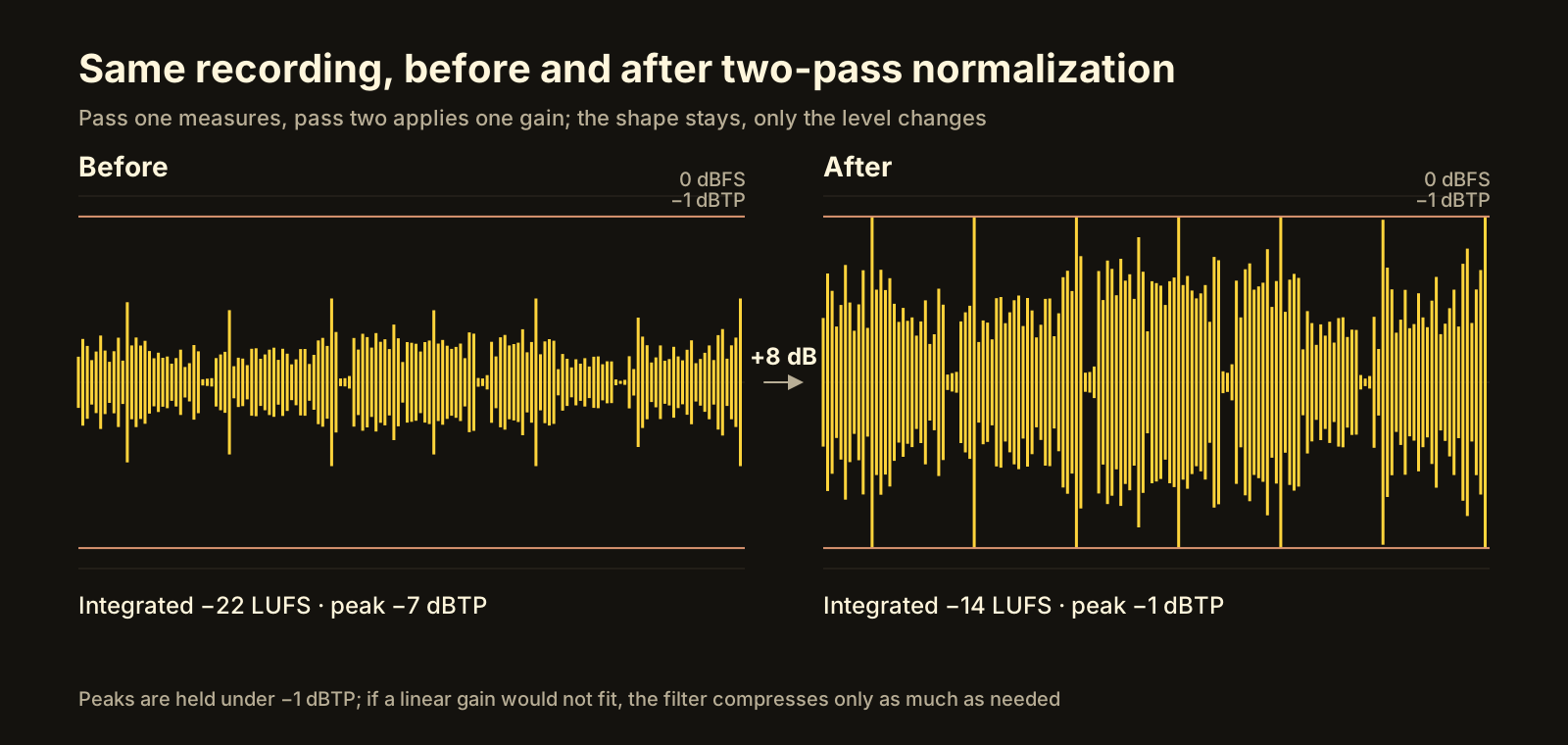 Before: quiet average, peaks well under the ceiling. After: average on target, peaks held at −1 dBTP, dynamics intact.
Should you high-pass at 75 Hz?
Usually yes for voice. Adult speech fundamentals sit roughly between 85 Hz (low male voices) and 255 Hz (high female voices); almost nothing useful in a talking-head recording lives below 75 Hz. What does live there: handling noise from the tripod, traffic rumble, air conditioning, wind, and 50 or 60 Hz mains hum. That energy counts toward the loudness measurement without adding anything you hear as “voice”, so it steals a dB or two of headroom you could have spent on the parts people listen to. A gentle high-pass at 75 Hz before normalization removes it. Skip the filter for music, bass-heavy content, or anything where the low end is the point.
How to normalize audio for YouTube, step by step
The outline below uses FFmpeg’s loudnorm filter, which implements the two-pass method and is documented on ffmpeg.org. Any tool that reports integrated LUFS and true peak follows the same logic.
- Measure. Run the filter in analysis mode and discard the output:
ffmpeg -i in.mp4 -af "highpass=f=75,loudnorm=I=-14:TP=-1:LRA=11:print_format=json" -f null -Include the high-pass here only if you will include it in step 3, so the measurement matches. - Read the numbers. The JSON at the end reports
input_i(integrated LUFS),input_tp,input_lra,input_threshandtarget_offset. A phone clip will show something likeinput_i: -22.3,input_tp: -4.1. - Correct, once. Feed those values back in and keep the video untouched:
ffmpeg -i in.mp4 -c:v copy -af "highpass=f=75,loudnorm=I=-14:TP=-1:LRA=11:measured_I=-22.3:measured_TP=-4.1:measured_LRA=9.8:measured_thresh=-32.7:offset=0.2:linear=true" -ar 48000 -c:a aac -b:a 192k out.mp4linear=trueasks for a plain gain when the true-peak ceiling allows it.-ar 48000matters becauseloudnormworks internally at 192 kHz and would otherwise write that out. - Check the result. Run step 1 on
out.mp4. You wantinput_iwithin about 0.5 of −14 andinput_tpat or below −1. - Match the rest of the upload. YouTube asks for AAC-LC at 48 kHz (its table suggests up to 384 kb/s for stereo; 192 kb/s is plenty for speech); the YouTube upload settings article has the video side. If the clip also goes to Instagram, the same −14 LUFS is a safe level there too, even though Meta publishes no target; see the Reels export settings.
- Upload, then verify. After processing, open Stats for nerds on your own video.
100% / 100%with content loudness near 0 dB means you landed it.
What does Becheloon do with audio?
Becheloon runs this two-pass process on every file it converts, without a setting to find. It measures the whole clip, brings it to −14 LUFS with a −1 dBTP true-peak ceiling, and writes AAC-LC at 192 kb/s and 48 kHz. The free report shows the measured loudness before you convert, so you know whether the file has the problem at all; a clip already at −14 is left alone. The done card shows the result next to the before figure and the peak.
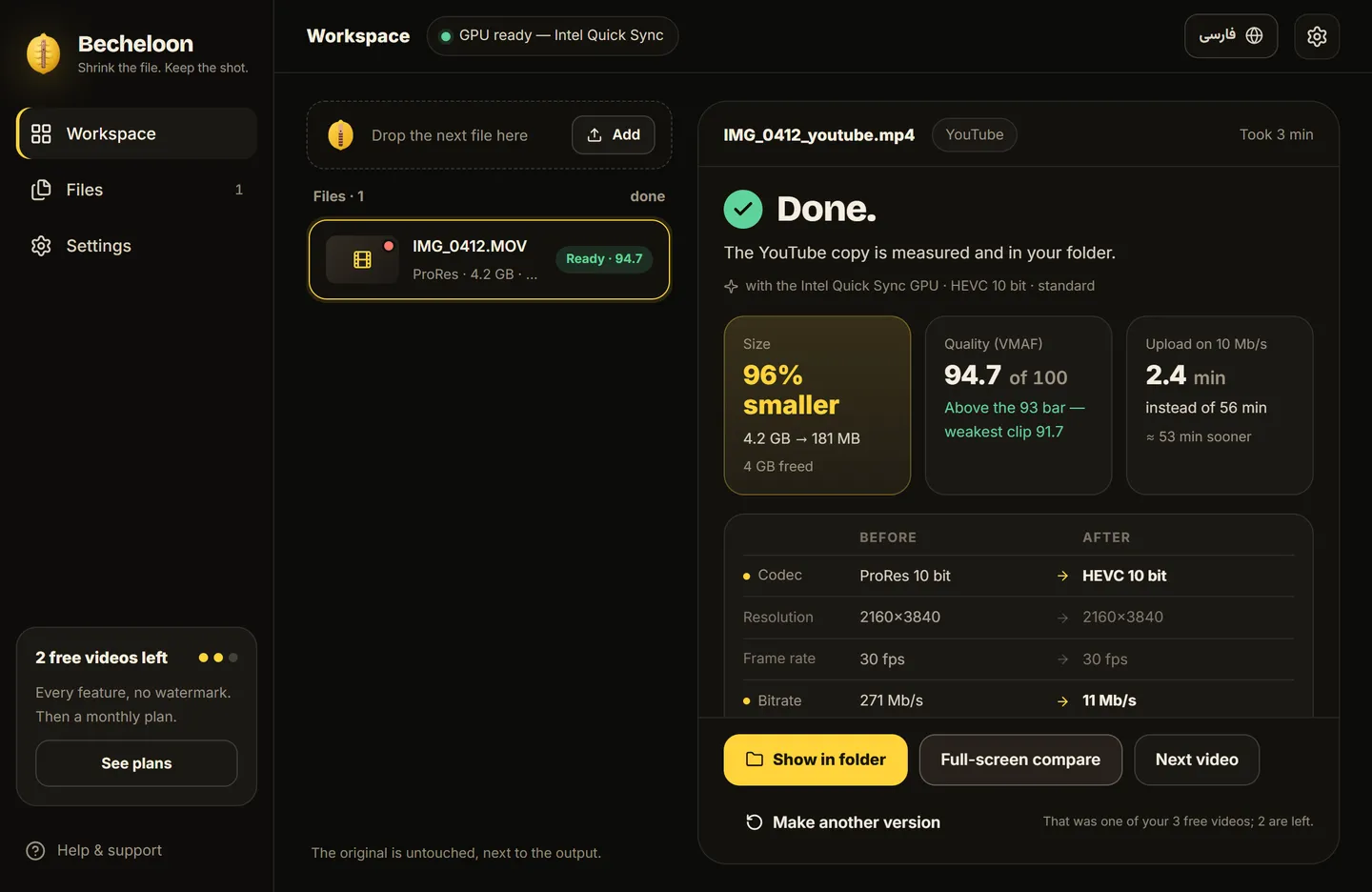 The audio tile on Becheloon’s done card: the target, the loudness before normalization, and the peak. (Numbers on the screenshot are sample values.)
The shortcut
Drop the file on Becheloon and read the free report: it tells you the integrated loudness, the bitrate and whether YouTube will turn the picture grey, before anything is converted. One click then makes the upload-ready copy on your own computer, offline, with the audio at −14 LUFS and the video measured with VMAF. The first three videos get every feature; after that it is a small monthly plan. Download it or see current prices.